LINQ (New Data Access Paradigm), when i hear it for the first time, i was sitting in a seminar and dotnet geeks were giving long lectures on it.It will make developer's life more easy.....
LINQ is a new data access paradigm which allows users to express SQL like syntax against a variety of data sources. LINQ can improve performance by allowing the back end data source to decide the best way to solve the query.
Was Amazed when used it in 2007 days for filtering CAML returned data.
CRUDQ options were allready there for maiking things good for us. but still there was something easy to implement was missing.
And finally with 2010 Microsoft given us LINQ to SharePoint.
Namespace Microsoft.SharePoint.Linq.
For people who are wondering , what is the use of it when we have CAML and more things availlable.
So for those the answer i have is its very fast, Even perform all CRUDQ options, you can bring data from multiple List and as well its very easy to write and intelliscence support we have for gettting the column names and more of the things for which we struggled alot in past looking deeper in internal names of the columns ows_xyz...
SharePoint now fully supports LINQ for querying lists so that you can query information from the platform in a more condensed, easier to understand format.
SPMETAL, the new command line utillity we have for providing the basic structure for LINQ.
In this Post i will be sharing my own experience of working with it and using LINQ to SHAREPOINT.
Writing LINQ queries are very easy but tricky things comes with SPMETAL generated code and how to use SPMETAL utillity and usage of Parameters.xml as parameter file in the command line and as well the way of utillizing the data fetched by LINQ query on EntityList.
First we will take the brief on how LINQ does the Processing(building CAML in the background and then we will come to SPMETAL and way to create the code using Parameter.xml and also i will take the case what if some fields doesnt appear the code file,how to do hard fixing(the term i normally say) )
Next i will explain, how to query with scope recurssive when querying Document Library for Folders.
In the end i will explain how to bind the data to a GridView with Template Columns to the Ienumerable list of data returned by LINQ query.
Showing posts with label SharePoint2010. Show all posts
Showing posts with label SharePoint2010. Show all posts
Thursday, May 26, 2011


Monday, February 14, 2011
MOSS to Sharepoint 2010 site Upgrade
Hello Folks Now as we have SharePoint 2010, most of us are looking forward to upgrade their present Moss site to their new SharePoint 2010 farm, this blog of mine will represent that only:
Just follow these steps:
Requirements
Before we Begin to do this amazing task let us discuss our requirements:
1) SharePoint Server 2010.
2) SQL Management Studio 2010.
Also the requirement is that the MOSS or wss site from which we are going to migrate to 2010 should be hosted in a farm with SP2 Upgrades of respective versions.
Initial Preperation
Following are the tasks which we are going to do here:
1) First take the Backup of MOSS/WSS hosted web application using SQL Management Studio 2005.
Remember we have to be very concise about naming of the backups, it should be consistent and same, with what is there right now, that’s why with MOSS SDK , Microsoft suggests:” please do change the name of Content Database while creating a web application”. See Below the best practice for creating a web application:

NOTE: we are migrating whole web application, so whatever sites will be there in web application will get migrated as well.
This is application Based migration.
•Taking Backup(on MOSS/WSS Farm)
A timer will start:

Which will display the current status of attaching wait once it get 100%.
When everythings goes fine then it will show follow screen with 100% status

Now its time to change the Site Administrators, WHY?Farm is new so could be possible we are at new Active Directory or Administrator could be Domain Specific, if your active directory is same then need not to worry about this section
For changing the Site administrators , In application management go to change site administrator and assign new administrators for this application.

Now its time for the Main action open your site collection in the web application.

Enter the credentials of the new administrators and here we go…
Now a surprise will comes to you, You will see the same 2007 site in 2010 with exactly same look and feel,

this is not what we require, So what to do next, for this go to next section : Visual Upgrade.
But the good thing was that everthying work exactly the same:
Search Working like it works in moss and everything was fine. Lets see if it remains same in next step:
•Doing Visual Upgrade
Now we will bring 2010 on it.
1)We will bring Ribbon and 2010 feel.
2) If necessary we will change master page config
3)We will cross check the functionality.
Now go to site actions and then site settings
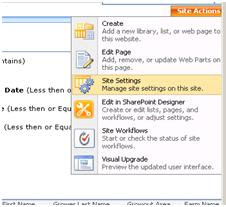
And then press Visual upgrade right below

And Update all sites, and that was it.
HURRAH…We Done IT..Finally:

Just follow these steps:
Requirements
Before we Begin to do this amazing task let us discuss our requirements:
1) SharePoint Server 2010.
2) SQL Management Studio 2010.
Also the requirement is that the MOSS or wss site from which we are going to migrate to 2010 should be hosted in a farm with SP2 Upgrades of respective versions.
Initial Preperation
Following are the tasks which we are going to do here:
1) First take the Backup of MOSS/WSS hosted web application using SQL Management Studio 2005.
Remember we have to be very concise about naming of the backups, it should be consistent and same, with what is there right now, that’s why with MOSS SDK , Microsoft suggests:” please do change the name of Content Database while creating a web application”. See Below the best practice for creating a web application:

NOTE: we are migrating whole web application, so whatever sites will be there in web application will get migrated as well.
This is application Based migration.
•Taking Backup(on MOSS/WSS Farm)

For taking back up follow these steps:
1) Go to Microsoft Sql management studio 2005, open the relative Sqlserver instance and then look for the “WSS_Content_31477”, which we created specifically for this application.
After restoring the database, Now provide the Web Application’s application pool Identity user “dbo.owner” rights for this database.
•Creating a Web Application in 2010
Now we will create a web application and on this application we will attach our WSS_Content_31477 database.
Go to central admin, create a new web application, please name the content database keeping in mind that we have to remove this later.
Go to manage applications and create a new web application:
Now we will delete its current database and attach our own database,
For doing that go to manage content database and select the current web application
Click on this particular database, Make the status to OFFLINE:

And press ok with Remove content database selected.
Now we have done with our detaching of database, now we will add our database to this web application using Powershell.
Open Sharepoint Powershell command prompt.
And write this command:
Mount-SPContentDatabase –Name WSS_Content_31477
–WebApplication “http://nameofwebapplication:port/
A timer will start:

Which will display the current status of attaching wait once it get 100%.
When everythings goes fine then it will show follow screen with 100% status

Now its time to change the Site Administrators, WHY?Farm is new so could be possible we are at new Active Directory or Administrator could be Domain Specific, if your active directory is same then need not to worry about this section
For changing the Site administrators , In application management go to change site administrator and assign new administrators for this application.

Now its time for the Main action open your site collection in the web application.

Enter the credentials of the new administrators and here we go…
Now a surprise will comes to you, You will see the same 2007 site in 2010 with exactly same look and feel,

this is not what we require, So what to do next, for this go to next section : Visual Upgrade.
But the good thing was that everthying work exactly the same:
Search Working like it works in moss and everything was fine. Lets see if it remains same in next step:
•Doing Visual Upgrade
Now we will bring 2010 on it.
1)We will bring Ribbon and 2010 feel.
2) If necessary we will change master page config
3)We will cross check the functionality.
Now go to site actions and then site settings

And then press Visual upgrade right below

And Update all sites, and that was it.
HURRAH…We Done IT..Finally:

Subscribe to:
Posts (Atom)